Run အက်ိဳးရွီပံုႏွင့္ Command

Run ဆိုတဲ့ အဓါပၸယ္နဲ ့အညီသူက ေျပးတာပါ.ဆိုလိုတဲ့သေဘာကေတာ့ ရန္ကုန္ကေန ခ်င္းျပည္နယ္သြားမယ္ဆိုပါစို ့ ဒီအတိုင္းသြားမယ္ဆိုလွ်င္ ကား၊ရထားတဆင့္ျပီးတဆင့္ေပါ့ ဒါေပမဲ့ Run မွာဆိုရင္ေတာ့ တခါတည္းနဲ ့မပန္းပမ္းဘဲေရာက္မယ္ေလဆိုေတာ႔ Run ကအသံုး၀င္တာေပါ့ဒီမ်ိဳးဘဲ ကြန္ပ်ဳတာမွာဆို Microsoft word ကိုဖြင့္မယ္ဆိုပါစို ့ Start-programs-Microsoft Office-Win word ေပါ့ဒီလိုဆိုအဆင့္ကလဲမ်ားတာေပါ့ဒါေပမဲ့ Run မွာက်ေတာ့ logo+R ကိုႏွိပ္ျပီး Win word ကိုဖြင့္မယ္ ဆိုရင္ ဒီမွာ winword ဆိုျပီးရိုက္ျပီးေတာ့ Enter ကိုႏွိပ္လိုက္နဲ ့တခါတည္းပြင့္လာမွာပါ..ဆိုေတာပ အခ်ိန္ကုန္သက္သာတာတဲ့အျပင္ typing လဲအက်င့္ျဖစ္တာေပါ့ ျပီးေတာ့အထူးသျဖင့္ ေနရာအတိအက်မသိတဲ့ဟာမ်ိဳး Registry လိုမ်ိဳးဆိုရင္လည္း Run မွာ regedit လိုရိုက္ျပီး enter ေခါက္ေပါ့ ဆိုေတာ့ Run ကအမ်ားႀကီးအက်ိဳးျပဳပါတယ္.ဒီအျပင္ Website ကိုလဲ Run မွာ လိပ္စာ ဥပမာ www.kohtet.blogspot.com ဆိုျပီးရိုက္ထည့္ရင္လဲဖြင့္လာမွာျဖစ္ပါတယ္.ျပီးေတာ့ Folder ေတြကိုလဲ သူရဲ႔ေနရာအတိအက်သိရင္သြားလို ့ရပါတယ္. ဥပမာ c:/windows ဆိုျပီးဖြင့္လို ့ရပါတယ္. ဆုိေတာ့ကၽြန္ေတာ္က ဒီအေၾကာင္းေလးနဲ ့အသံုး၀င္ပံုေလးကို ေျပာျပတာဘဲျဖစ္ပါတယ္.ဘာျဖစ္လို့လဲဆိုေတာ့ ေတာ္ေတာ္မ်ားမ်ားက Run မွာသံုးလို ့ရေသာ commands မ်ားဆိုျပီး တင္ေပမဲ့ အသံုးမျပဳဘူးတဲ့ သူမ်ားအတြက္အထူးအဆန္းျဖစ္မွာ စိုးလို ့ အက်ိဳးရွိပံုေလးကို ေဖာ္ျပေပးလိုပါတယ္. ေအာက္မွာ အသံုးျပဳလို ့ရေသာ commands ေလးေတြကိုေဖာ္ျပေပးလိုက္ပါတယ္.
| To Access… | Run Command | |||||
|---|---|---|---|---|---|---|
| Accessibility Controls............................................................................... | access.cpl | |||||
| Accessibility Wizard.................................................................................. | accwiz | |||||
| Add Hardware Wizard............................................................................. | hdwwiz.cpl | |||||
| Add/Remove Programs........................................................................... | appwiz.cpl | |||||
| Administrative Tools................................................................................ | control admintools | |||||
| Adobe Acrobat (if installed)..................................................................... | acrobat | |||||
| Adobe Designer (if installed)................................................................... | formdesigner | |||||
| Adobe Distiller (if installed)..................................................................... | acrodist | |||||
| Adobe ImageReady (if installed)............................................................ | imageready | |||||
| Adobe Photoshop (if installed)................................................................ | photoshop | |||||
| Automatic Updates................................................................................... | wuaucpl.cpl | |||||
| Bluetooth Transfer Wizard...................................................................... | fsquirt | |||||
| Calculator................................................................................................... | calc | |||||
| Certificate Manager.................................................................................. | certmgr.msc | |||||
| Character Map.......................................................................................... | charmap | |||||
| Check Disk Utility..................................................................................... | chkdsk | |||||
| Clipboard Viewer...................................................................................... | clipbrd | |||||
| Command Prompt.................................................................................... | cmd | |||||
| Component Services................................................................................. | dcomcnfg | |||||
| Computer Management........................................................................... | compmgmt.msc | |||||
| Control Panel............................................................................................. | control | |||||
| Date and Time Properties........................................................................ | timedate.cpl | |||||
| DDE Shares................................................................................................ | ddeshare | |||||
| Device Manager......................................................................................... | devmgmt.msc | |||||
| Direct X Control Panel (if installed)*...................................................... | directx.cpl | |||||
| Direct X Troubleshooter........................................................................... | dxdiag | |||||
| Disk Cleanup Utility.................................................................................. | cleanmgr | |||||
| Disk Defragment....................................................................................... | dfrg.msc | |||||
| Disk Management..................................................................................... | diskmgmt.msc | |||||
| Disk Partition Manager............................................................................ | diskpart | |||||
| Display Properties..................................................................................... | control desktop | |||||
| Display Properties..................................................................................... | desk.cpl | |||||
| Display Properties (w/Appearance Tab Preselected)......................... | control color | |||||
| Dr. Watson System Troubleshooting Utility......................................... | drwtsn32 | |||||
| Driver Verifier Utility............................................................................... | verifier | |||||
| Event Viewer............................................................................................. | eventvwr.msc | |||||
| Files and Settings Transfer Tool............................................................. | migwiz | |||||
| File Signature Verification Tool............................................................... | sigverif | |||||
| Findfast....................................................................................................... | findfast.cpl | |||||
| Firefox (if installed)................................................................................... | firefox | |||||
| Folders Properties..................................................................................... | folders | |||||
| Fonts........................................................................................................... | control fonts | |||||
| Fonts Folder............................................................................................... | fonts | |||||
| Free Cell Card Game................................................................................. | freecell | |||||
| Game Controllers...................................................................................... | joy.cpl | |||||
| Group Policy Editor (XP Prof)................................................................. | gpedit.msc | |||||
| Hearts Card Game.................................................................................... | mshearts | |||||
| Help and Support...................................................................................... | helpctr | |||||
| HyperTerminal.......................................................................................... | hypertrm | |||||
| Iexpress Wizard........................................................................................ | iexpress | |||||
| Indexing Service........................................................................................ | ciadv.msc | |||||
| Internet Connection Wizard.................................................................... | icwconn1 | |||||
| Internet Explorer...................................................................................... | iexplore | |||||
| Internet Properties................................................................................... | inetcpl.cpl | |||||
| Internet Setup Wizard.............................................................................. | inetwiz | |||||
| IP Configuration (Display Connection Configuration).......................... | ipconfig /all | |||||
| IP Configuration (Display DNS Cache Contents).................................. | ipconfig /displaydns | |||||
| IP Configuration (Delete DNS Cache Contents).................................... | ipconfig /flushdns | |||||
| IP Configuration (Release All Connections)........................................... | ipconfig /release | |||||
| IP Configuration (Renew All Connections)............................................ | ipconfig /renew | |||||
| IP Configuration (Refreshes DHCP & Re-Registers DNS).................. | ipconfig /registerdns | |||||
| IP Configuration (Display DHCP Class ID)............................................ | ipconfig /showclassid | |||||
| IP Configuration (Modifies DHCP Class ID).......................................... | ipconfig /setclassid | |||||
| Java Control Panel (if installed).............................................................. | jpicpl32.cpl | |||||
| Java Control Panel (if installed).............................................................. | javaws | |||||
| Keyboard Properties................................................................................. | control keyboard | |||||
| Local Security Settings............................................................................. | secpol.msc | |||||
| Local Users and Groups........................................................................... | lusrmgr.msc | |||||
| Logs You Out Of Windows....................................................................... | logoff | |||||
| Malicious Software Removal Tool........................................................... | mrt | |||||
| Microsoft Access (if installed).................................................................. | msaccess | |||||
| Microsoft Chat........................................................................................... | winchat | |||||
| Microsoft Excel (if installed).................................................................... | excel | |||||
| Microsoft Frontpage (if installed)........................................................... | frontpg | |||||
| Microsoft Movie Maker............................................................................ | moviemk | |||||
| Microsoft Paint.......................................................................................... | mspaint | |||||
| Microsoft Powerpoint (if installed)......................................................... | powerpnt | |||||
| Microsoft Word (if installed).................................................................... | winword | |||||
| Microsoft Syncronization Tool................................................................. | mobsync | |||||
| Minesweeper Game.................................................................................. | winmine | |||||
| Mouse Properties...................................................................................... | control mouse | |||||
| Mouse Properties...................................................................................... | main.cpl | |||||
| Nero (if installed)....................................................................................... | nero | |||||
| Netmeeting................................................................................................. | conf | |||||
| Network Connections................................................................................ | control netconnections | |||||
| Network Connections................................................................................ | ncpa.cpl | |||||
| Network Setup Wizard............................................................................. | netsetup.cpl | |||||
| Notepad...................................................................................................... | notepad | |||||
| Nview Desktop Manager (if installed).................................................... | nvtuicpl.cpl | |||||
| Object Packager......................................................................................... | packager | |||||
| ODBC Data Source Administrator.......................................................... | odbccp32.cpl | |||||
| On Screen Keyboard................................................................................. | osk | |||||
| Opens AC3 Filter (if installed)................................................................. | ac3filter.cpl | |||||
| Outlook Express........................................................................................ | msimn | |||||
| Paint............................................................................................................ | pbrush | |||||
| Password Properties................................................................................. | password.cpl | |||||
| Performance Monitor............................................................................... | perfmon.msc | |||||
| Performance Monitor............................................................................... | perfmon | |||||
| Phone and Modem Options..................................................................... | telephon.cpl | |||||
| Phone Dialer............................................................................................... | dialer | |||||
| Pinball Game.............................................................................................. | pinball | |||||
| Power Configuration ................................................................................ | powercfg.cpl | |||||
| Printers and Faxes.................................................................................... | control printers | |||||
| Printers Folder.......................................................................................... | printers | |||||
| Private Character Editor.......................................................................... | eudcedit | |||||
| Quicktime (If Installed)............................................................................ | QuickTime.cpl | |||||
| Quicktime Player (if installed)................................................................. | quicktimeplayer | |||||
| Real Player (if installed)........................................................................... | realplay | |||||
| Regional Settings....................................................................................... | intl.cpl | |||||
| Registry Editor.......................................................................................... | regedit | |||||
| Registry Editor.......................................................................................... | regedit32 | |||||
| Remote Access Phonebook...................................................................... | rasphone | |||||
| Remote Desktop........................................................................................ | mstsc | |||||
| Removable Storage................................................................................... | ntmsmgr.msc | |||||
| Removable Storage Operator Requests................................................. | ntmsoprq.msc | |||||
| Resultant Set of Policy (XP Prof)............................................................ | rsop.msc | |||||
| Scanners and Cameras............................................................................. | sticpl.cpl | |||||
| Scheduled Tasks........................................................................................ | control schedtasks | |||||
| Security Center.......................................................................................... | wscui.cpl | |||||
| Services....................................................................................................... | services.msc | |||||
| Shared Folders........................................................................................... | fsmgmt.msc | |||||
| Shuts Down Windows............................................................................... | shutdown | |||||
| Sounds and Audio...................................................................................... | mmsys.cpl | |||||
| Spider Solitare Card Game...................................................................... | spider | |||||
| SQL Client Configuration.......................................................................... | cliconfg | |||||
| System Configuration Editor................................................................... | sysedit | |||||
| System Configuration Utility................................................................... | msconfig | |||||
| System File Checker Utility (Scan Immediately)................................. | sfc /scannow | |||||
| System File Checker Utility (Scan Once At The Next Boot)............... | sfc /scanonce | |||||
| System File Checker Utility (Scan On Every Boot).............................. | sfc /scanboot | |||||
| System File Checker Utility (Return Scan Setting To Default).......... | sfc /revert | |||||
| System File Checker Utility (Purge File Cache)................................... | sfc /purgecache | |||||
| System File Checker Utility (Sets Cache Size to size x)....................... | sfc /cachesize=x | |||||
| System Information.................................................................................. | msinfo32 | |||||
| System Properties..................................................................................... | sysdm.cpl | |||||
| Task Manager............................................................................................ | taskmgr | |||||
| TCP Tester................................................................................................. | tcptest | |||||
| Telnet Client............................................................................................... | telnet | |||||
| Tweak UI (if installed)............................................................................. | tweakui | |||||
| User Account Management..................................................................... | nusrmgr.cpl | |||||
| Utility Manager......................................................................................... | utilman | |||||
| Windows Address Book............................................................................ | wab | |||||
| Windows Address Book Import Utility.................................................. | wabmig | |||||
| Windows Backup Utility (if installed)..................................................... | ntbackup | |||||
| Windows Explorer..................................................................................... | explorer | |||||
| Windows Firewall...................................................................................... | firewall.cpl | |||||
| Windows Magnifier................................................................................... | magnify | |||||
| Windows Management Infrastructure................................................... | wmimgmt.msc | |||||
| Windows Media Player............................................................................. | wmplayer | |||||
| Windows Messenger................................................................................. | msmsgs | |||||
| Windows Picture Import Wizard (need camera connected)............... | wiaacmgr | |||||
| Windows System Security Tool............................................................... | syskey | |||||
| Windows Update Launches...................................................................... | wupdmgr | |||||
| Windows Version (to show which version of windows)........................ | winver | |||||
| Windows XP Tour Wizard........................................................................ | tourstart | |||||
| Wordpad..................................................................................................... | write | . |
myanmar 3 unicode install လုပ္နည္း.....
Myanmar 3 Unicode ကိုအသံုးျပဳေတာ့မယ္လို႔ၾကားပါတယ္..... အခုလက္ရွိေတာင္ အစိုးရဌာန မ်ားမွာ Myanmar 3 ကိုေျပာင္းလဲလိုက္ျပီလို႔ သိရပါတယ္ ဒါေၾကာင့္ ကြ်န္ေတာ္
myanmar3 ရိုက္လို႔မရတဲ႔သူငယ္ခ်င္းေတြက်ေနာ္ ေပးထားတဲ႔ အဆင္႔ေလးေတြအတိုင္းလုပ္ၾကည္႔ပါ...
အဆင္႔(၁)...ဒီေနရာမွာ ေလာေလာဆယ္ update ၿဖစ္ေနတဲ႔ myanmar3 font နဲ႕ အကၡရာကီးဘုတ္ကို ေဒါင္းလုတ္ လုပ္ပါ.... ေပၚလာတဲ႔ page download ဆိုတာေလးကိုႏွိပ္ၿပီးေအာက္ဆံုးက myanmar3 font file နဲ႔ Ekaya keyboard and myanmar3 fonts installer ကိုေဒါင္းလိုက္ပါ....ၿပီးေတာ႔ myanmar3 font ကို Control panel\Fonts ဖိုဒါထဲသြားထည္႔လိုက္ပါ....ၿပီးရင္ အကၡရာကီးဘုတ္ကို install လုပ္ပါ....အကၡရာကီးဘုတ္ကို install လုပ္တဲ႔အခါ ေအာက္က ပံုေလးမွာ ၿပထားတဲ႔အတိုင္း myanmar3 unicode 5.2 keyboard ကိုေရြးေပးဖို႔မေမ႔ပါနဲ႔....

၁။ဒီေနရာကေန NHM ဆိုတဲ႔ ေဆာ့၀ဲေလးကို ေဒါင္းလုဒ္ လုပ္ဖုိ႕ လုိအပ္ပါတယ္...
၂။ ေဒါင္းလုတ္ၿပီးတာ နဲ႔ ကုိယ္ထားခ်င္တဲ႔ေနရာမွာ Extract လုပ္ပါ...
၃။NhmWriter.exe ကို run ပါ.. Taskbar ေပၚရွိ Tray Icon မွာ ေခါင္းေလာင္းပံုေလးကို ေတြ႕ရမွာျဖစ္ပါတယ္.... ေမာက္စ္နဲ႔ ေထာက္ၾကည့္ပါ (အလြယ္မွတ္ရန္ Alt +1 =Myanmar3) ေခါင္းေလာင္းေလး အ၀ါေရာင္ေျပာင္းသြားရင္ Myanmar3 ကိုရိုက္လို႕ရပါျပီ... .. သူက ေဇာ္ဂ်ီလက္ကြက္နဲ႔ ရိုက္တာကို Myanmar3 unicode နဲ႔ ေဖာ္ျပေပးနိုင္တာပါပဲ.. ဒီလိုေဖာ္ျပေပးနိုင္ဖို႕အတြက္ IT ပညာရွင္တစ္ဦးျဖစ္တဲ႔ ကိုရာဗီ ဆိုသူက စည္းမ်ဥ္းေပါင္း ၁သိန္းေက်ာ္ ပါ၀င္တဲ႔ Keyboard ဖိုင္ကို ဖန္တီးခဲ႔ျပီး India က NHM(New Horizon Media) Company မွ တဆင့္ အခမဲ႔ျဖန္႕ေ၀ခဲ႔တယ္လို႕ သိရပါတယ္...
သတိထားရန္.... NHM ကိုအသံုးျပဳေနစဥ္မွာ ေဇာ္ဂ်ီကိုျပန္ေျပာင္းဖို႕ Ctrl + Shift ကို ႏွိပ္လို႕မရပါဘူး...
Alt +1 or Alt + 0 ကိုႏွိပ္မွ ေခါင္းေလာင္းေလးက ျပန္မွိန္သြားျပီး ေဇာ္ဂ်ီကိုျပန္လည္အသံုးျပဳလို႕ရမွာျဖစ္ပါတယ္...
အဆင္႔(၃)...ဒီနည္းလမ္းကေတာ့ အကၡရာကီးဘုတ္ကို အသံုးျပဳျခင္းပါ... 32bit, 64bit ၀င္းဒိုးေတြကို အဆင္ေျပေအာင္ လုပ္ေပးထားျခင္းပါ....
အကၡရာကီးဘုတ္ layoutကေတာ႔ က်ေနာ္တင္ထားေပးပါတယ္..လိုရမယ္ရ ၿပည္႔စံုသြားေအာင္တခါတည္းတင္ေပးလိုက္ပါတယ္...
 အားလံုးပဲ အဆင္ေၿပလိမ္႔မယ္လို႔ ေမွ်ာ္လင္႔ပါတယ္
Window 7 Version အနိမ့္ကေနအျမင့္ UpGrade လုပ္နည္း


- Windows 7 Starter ကေန ဆုိရင္ Home premium, Professional,Ultimate သုံးမ်ိဳးမွာ ကုိႀကိဳက္တဲ့ version ကုိ upgrade လုပ္လုိ႔ ရပါတယ္.
- Windows 7 Home premium ကေနဆုိရင္ေတာ့ Professional ႏွင့္ Ultimate ႏွစ္မ်ိဳးမွာ ကုိႀကိဳက္တဲ့ version ကုိ upgrade လုပ္လုိ႔ ရပါတယ္.
- Windows 7 Professional ကေနဆုိရင္ေတာ့ Ultimate တစ္မ်ိဳးကုိပဲ upgrade လုပ္လုိ႔ရမွာပါ.
အဲ့ေတာ့ upgrade လုပ္နည္းကုိ ေျပာျပပါ့မယ္.
- Start ရဲ႕အေပၚမွာ Search Programs and Files ဆုိတဲ့ Search box ေလးတစ္ခု ရွိပါတယ္. အဲ့ဒီ့အကြက္ထဲမွာ ပုံထဲကအတုိင္း Anytime Upgrade လုိ႔ပဲ ရုိက္ရုိက္ Windows Anytime Upgrade လုိ႔ရုိက္ရုိက္ ႀကိဳက္သလုိ ရုိက္ရွာလုိက္ပါ အေပၚက result မွာ windows anytime upgrade ဆုိၿပီးေတာ့ ေတြ႔ရပါလိမ့္မယ္.

- ေတြ႔တဲ့ Windows Anytime Upgrade ဆုိတဲ့ icon ေလးကုိ ႏွိပ္လုိက္ပါ. ေအာက္ကပုံအတုိင္း Windows Anytime Upgrade လုပ္ဖုိ႔အတြက္ ေပၚလာပါလိမ့္မယ္.

- အဲ့ထဲမွာမွ Enter an upgrade key ဆုိတဲ့အကြက္ကုိ ႏွိပ္ရမွာျဖစ္ပါတယ္. ႏွိပ္လုိက္ပါ. ၿပီးတာနဲ႔ ေအာက္က ပုံအတုိင္း Enter an upgrade key ဆိုတဲ့ xxxxx.xxxxx.xxxxx.xxxxx.xxxxx ဆုိတဲ့အကြက္မွာ ေအာက္က ေပးထားတဲ့ ကီးကုိ ထည့္လုိက္ပါ. ကုိေျပာင္းခ်င္တဲ့ version ရဲ႕ key ကုိ ရုိက္ထည့္ရမွာ ျဖစ္ပါတယ္.
Window 7 Home Premium
6RBBT-F8VPQ-QCVPQ-KHRB8-RMV82
Window 7 Professional
VTDC3-WM7HP-XMPMX-K4YQ2-WYGJ8
6RQ9V-6GCG4-8WV2H-966GF-DQ4DW
32KD2-K9CTF-M3DJT-4J3WC-733WD
(မိမိႀကိဳက္တဲ့ တစ္ေၾကာင္းကုိသာ ရုိက္ထည့္ရမွာျဖစ္ပါတယ္)
Window 7 Ultimate
FJGCP-4DFJD-GJY49-VJBQ7-HYRR2
342DG-6YJR8-X92GV-V7DCV-P4K27
(မိမိႀကိဳက္တဲ့ တစ္ေၾကာင္းကုိသာ ရုိက္ထည့္ရမွာျဖစ္ပါတယ္)
- ရုိက္ထည့္ၿပီးတာနဲ႔ Next ကုိ ႏွိပ္လုိက္ပါ.

- ကဲ ရုိက္ထည့္ၿပီးၿပီ ဆုိရင္ေတာ့ ေအာက္ကပုံအတုိင္း မိမိထည့္ထားတဲ့ key ကုိ verifying လုပ္ေနတာကုိ ေတြ႔ရပါလိမ့္မယ္.

- verify လုပ္ၿပီးသြားရင္ေတာ့ ေအာက္ကပုံအတုိင္း ေပၚလာပါလိမ့္မယ္. I accept ဆိုတာကုိ တစ္ခ်က္ ႏွိပ္ေပးလုိက္ပါ.


USB အသံုးျပဳျခင္းကို ပိတ္ရေအာင္
ကြန္ပ်ဴတာ ေတာ္ေတာ္မ်ားမ်ားကို security အရနဲ႔ virus ေတြ ဝင္မွာ စုိးတဲ့အတြက္ USB Storage device ေတြျဖစ္တဲ့ memory stick, MP3/MP4 Player, Digital Camera, USB portable harddisk ေတြကို အသုံးျပဳခြင့္ ပိတ္ထားတယ္... က်ေတာ့္ ႐ုံးမွာေတာ့ CMOS ထဲကေန USB ကို disable လုပ္ထားတဲ့အျပင္ USB port ေတြကိုပါ physical အရပါ ပိတ္ထားရတယ္... အခုေတာ့ Windows XP မွာ USB storage device ေတြကိုပဲ အသုံးျပဳခြင့္ ပိတ္ခ်င္တယ္ ဆုိရင္ ဘယ္လုိ ပိတ္ရမလဲ ဆုိတဲ့ နည္းကို google ေက်းဇူးနဲ႔ ရွာေတြ႕ၿပီ...
အခုေရးမယ့္ အဆင့္ေတြကေတာ့ USB storage device တစ္ခုခု အနည္းဆုံး ၁-ခါ တစ္ခါ တပ္ဆင္ အသုံးျပဳဖူးတဲ့ Windows XP သုံး ကြန္ပ်ဴတာေတြ အတြက္ပါ... မိမိ အသုံးျပဳေနတဲ့ user account ဟာ administrator အဆင့္ေတာ့ ရွိစရာလုိပါတယ္...
1. ပထမအဆင့္အေနနဲ႔ Start ကို click လုပ္ၿပီး Run ကို ေရြးပါ... (Windows Key + R ကို ႏွိပ္ရင္လည္း ရပါတယ္...)
2. ေပၚလာတဲ့ Open ရဲ႕ေဘးမွာ ရွိတဲ့ text box ထဲမွာ regedit လုိ႔႐ုိက္ထည့္ၿပီး OK ကို ကလစ္လုပ္ပါ...
Registry Editor ေပၚလာၿပီဆုိရင္...
3. HKEY_LOCAL_MACHINE » SYSTEM » CurrentControlSet » Services » UsbStor
4. ညာဘက္ pane ထဲက Start ကို double click ေခါက္ပါ...
5. Value Data ေအာက္ကပ္ရပ္မွာ ရွိတဲ့ text box ထဲမွာ 4 လုိ႔ ျပင္႐ုိက္ထည့္ပါ... Hexadecimal ကို မေရြးထားရင္ ေရြးေပးပါ... ၿပီးရင္ OK ကိုႏွိပ္ပါ...
(USB Storage device ေတြ အသုံးျပဳခြင့္ ျပန္ေပးခ်င္တယ္ ဆုိရင္ေတာ့ 3 လုိ႔႐ုိက္ထည့္ ေပးရမွာပါ...)
6. Registy Editor ထဲမွ ထြက္ပါ...
USB Storage device ေတြကို အသုံးျပဳလုိ႔ ရေတာ့မွာ မဟုတ္ပါဘူး... ဒါေပမယ့္ က်န္တဲ့ USB device ေတြျဖစ္တဲ့ printer, keyboard, mouse ေတြေတာ့ ဆက္လက္ အသုံးျပဳႏုိင္ေၾကာင္း စမ္းသပ္ ေတြ႕ရွိခဲ့ပါသည္... အေပၚကအဆင့္ေတြဟာ Registry ကို ျပင္ရတာျဖစ္တဲ့ အတြက္ အႏၲရာယ္ရွိပါတယ္... မျပင္ခင္မွာ Registry ကို backup ႀကိဳလုပ္ထားပါ... အေပၚကအဆင့္ေတြ ႐ႈပ္လုိ႔ မျပင္ခ်င္ဘူးဆုိရင္ USB Storage Device ေတြ မသုံးေစခ်င္ရင္ http://maunghla.googlepages.com/USBstorageDisable.reg ကို download လုပ္ၿပီး run ပါ... ပိတ္ထားတဲ့ USB Storage Device ေတြ ျပန္သုံးခ်င္တယ္ ဆုိရင္ေတာ့ http://maunghla.googlepages.com/USBstorageEnable.reg ကို download လုပ္ၿပီး run ပါ... အဆင္ေျပႏိုင္ပါေစ
Registry Backup and Restore
Windows Registry ဟာ OS နဲ႔ program ေတြ အားလံုး စုေ၀းထိန္းခ်ဳပ္ ထားတယ္လို႔ ေယဘူယ် ေျပာႏိုင္ပါတယ္။ Registry နဲ႔ ပတ္သက္ၿပီး ခ်ိန္ညိွ ျပင္ဆင္ ဖို႔လိုတိုင္း ဦးစြာ backup လုပ္ထား ရပါတယ္။ အခက္အခဲ တစ္စံုတစ္ရာ ႀကံဳလာရင္ restore ျပန္လုပ္ ႏိုင္ေအာင္ပါ။ Registry ရဲ႕ အေရးႀကီးတဲ့ က႑ တစ္ခု မွားသြားရင္ သံုးမရေအာင္ OS က ရပ္ဆိုင္း သြားတတ္တာကိုး....
Reg. backup,restore and reg. defrag အသင့္ လုပ္ေပးတဲ့ ေဆာဖ့္၀ဲလ္ မ်ားစြာ ႐ွိပါတယ္။ ဒါကို အၿမဲ မတင္ ထားခ်င္ဘူး အဆင္သင့္ ျဖစ္မေနဘူး ဆိုရင္ manual backup လုပ္လိုက္တာေပါ့။ Basic user အတြက္လည္း မခက္ခဲ လွပါဘူး။ Windows မွာ build-in ပါၿပီးသားမို႔ အဆင့္ဆင့္ လုပ္ၾကည္႕႐ံုပါဘဲ။
Backup လုပ္ဖို႔ အတြက္ Start all programs accessories system tools system restore ကို ေ႐ြးခ်ယ္ေပးပါ။

System restore windows မွာ To create a restore point ကို ထပ္ႏိွပ္ရင္ system properties ေရာက္ သြားပါမယ္။

Create ကိုႏိွပ္ၿပီး အမည္တစ္ခု(Regbackup) ေပးကာ restore point တစ္ခု ဖန္တီးျခင္း အဆံုးသတ္ ႏိုင္ပါၿပီ။
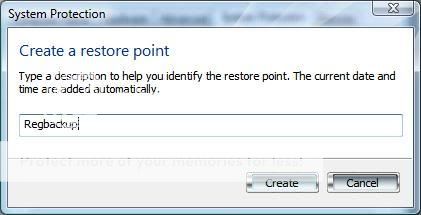
Restore ျပန္လုပ္မယ္ဆို ပထမ ဘက္အပ္ လုပ္ခဲ့တဲ့ အဆင့္ အတိုင္း Start all programs accessories system tools system restore ကို ေ႐ြးခ်ယ္ေပးပါ။
Choose a diffirent restore point ကို ေ႐ြး႐်္ Regbackup file ကို restore ျပန္လုပ္ ေပး႐ံုပါဘဲ။ restore လုပ္ငန္း ၿပီးဆံုးရင္ ကြန္ျပဴတာမွ auto restart လုပ္ေပး ပါလိမ့္မယ္။

အကယ္႐်္ ၀င္းဒိုး မတက္ေသးရင္ boot လုပ္ေနခ်ိန္မွာ F8 key ကို ဖိထားၿပီး Advanced Boot Options screen ကို ေခါ ္လိုက္ပါ။ Last Known Good Configuration (advanced) ကိုေရြးျခင္းျဖင့္လည္း ေနာက္ဆံုး logon လုပ္ခဲ့တဲ့ အေျခအေနကို ေ႐ြးယူ ႏိုင္ပါေသးတယ္။

ဒီထက္ ပိုလုပ္ႏိုင္တာ ကေတာ့ system recovery options မွာ system restore ကို ေရြးေပးျခင္းပါ။ ဒါေပမယ့္ vista မွာဘဲ ရပါတယ္။
registry ထဲ ၀င္ေမႊရင္ အေတာ္အသင့္ အမွားေလာက္ေတာ့ ကာကြယ္ ႏိုင္သြားပါမယ္။
သယ္ရင္းမ်ားအာားလံုးအဆင္ေျပမယ္လို႔ေမ်ွာ္လင့္မိပါတယ္
How To Do Mouse Pointer Design
ေအာက္က ပံုအတိုင္း Start Menu ကိုႏွိပ္လိုက္ပါ။ ဒါဆို ေအာက္ကပံုမွာ ၀ိုင္းျပထားတဲ့ေနရာမွာ Mouse လို႕ ရွာလိုက္ပါ။ ရွာပံုရွာနည္းက တစ္ေယာက္နဲ႕တစ္ေယာက္ မတူၾကပါဘူး။ ဒါေပမဲ့ အတူတူပါပဲ။ Control Panel ထဲမွာလည္း ၀င္ရွာလို႕ရပါတယ္။ ေအာက္ပံု ......


